Printer
The Android WAMA app is compatible with printers that support the ESC/POS protocol.
Tested printers
The following printers have been tested and should work correctly with the app:
- GOOJPRT PT-210
How to use a bluetooth printer
- Open the bluetooth settings of your Android device and pair your bluetooth printer
- Open WAMA and select
Settings>Printer
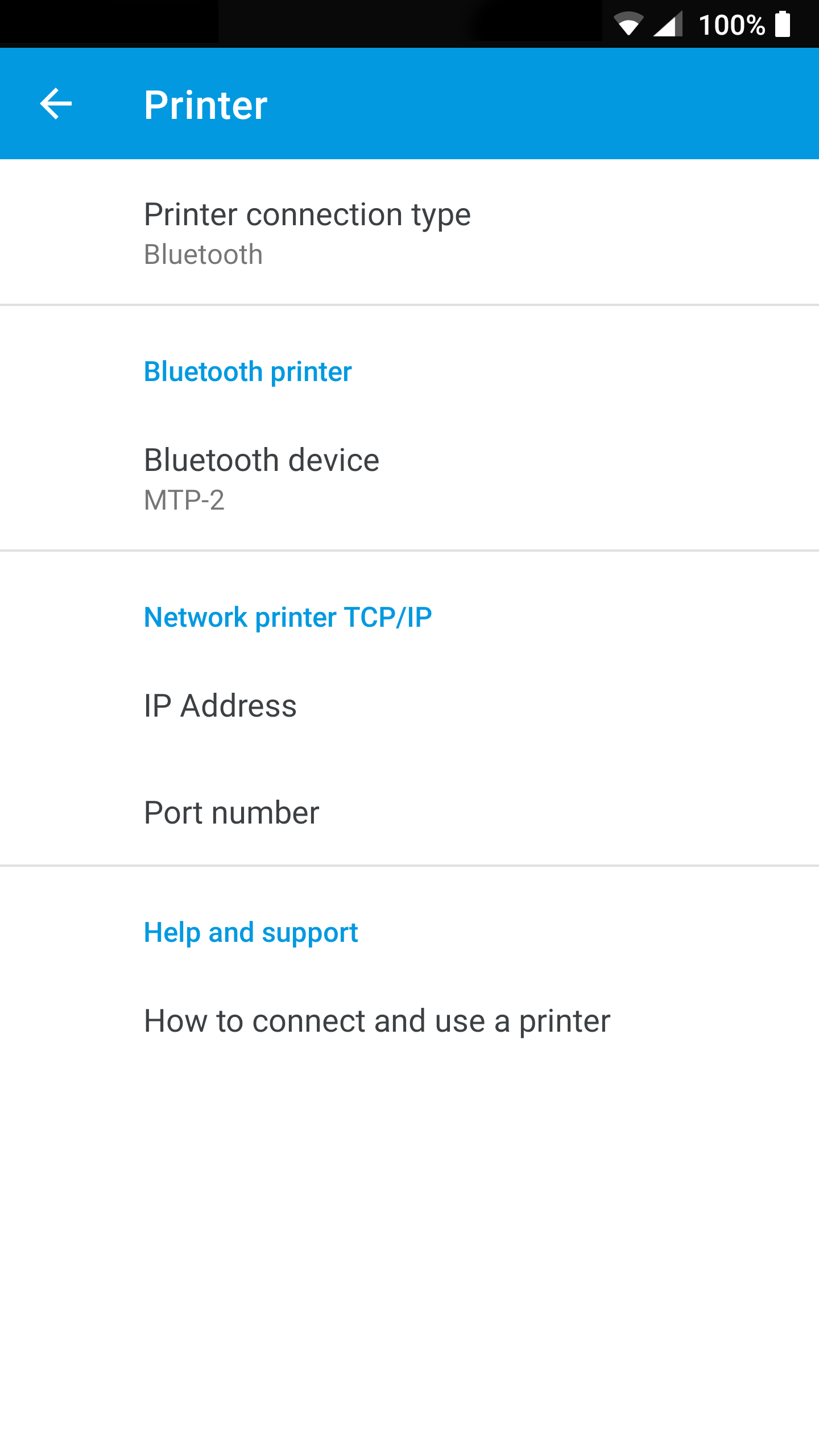
- Click on
Print connection typeand selectBluetooth - Click on
Bluetooth deviceand select your default printer - You are ready to print sales orders
How to use a USB printer
- Connect the ESC/POS printer to your Android device with a USB OTG cable (if required by the device)
- Open WAMA and select
Settings>Printer - Click on
Print connection typeand selectUSB - Select the connected USB printer when prompted
- Print a sales order to verify the connection
How to use a TCP/IP (network) printer
- Connect the printer to the same Wi‑Fi or local network as your Android device and note its IP address
- Open WAMA and select
Settings>Printer - Click on
Print connection typeand selectTCP/IP(or network) - Enter the printer IP address and port if asked
- Print a sales order to verify the connection
Note
Printer support depends on the device and on ESC/POS compatibility. If printing fails, check that the printer is powered on, paired or reachable on the network, and that the connection type in WAMA matches how the printer is connected.